Night Sky on Apple TV: tonight's real sky on the big screen (Everdust 1.1)
Everdust 1.1 for Apple TV puts the real sky over your city on your TV. Swipe on the Siri Remote to look around, run time, draw constellation lines and star trails, and click a nebula or galaxy to fly into real Hubble and Webb photographs. How to use it with the remote, what to look for in the evenings from now to the Geminids, and what's free.
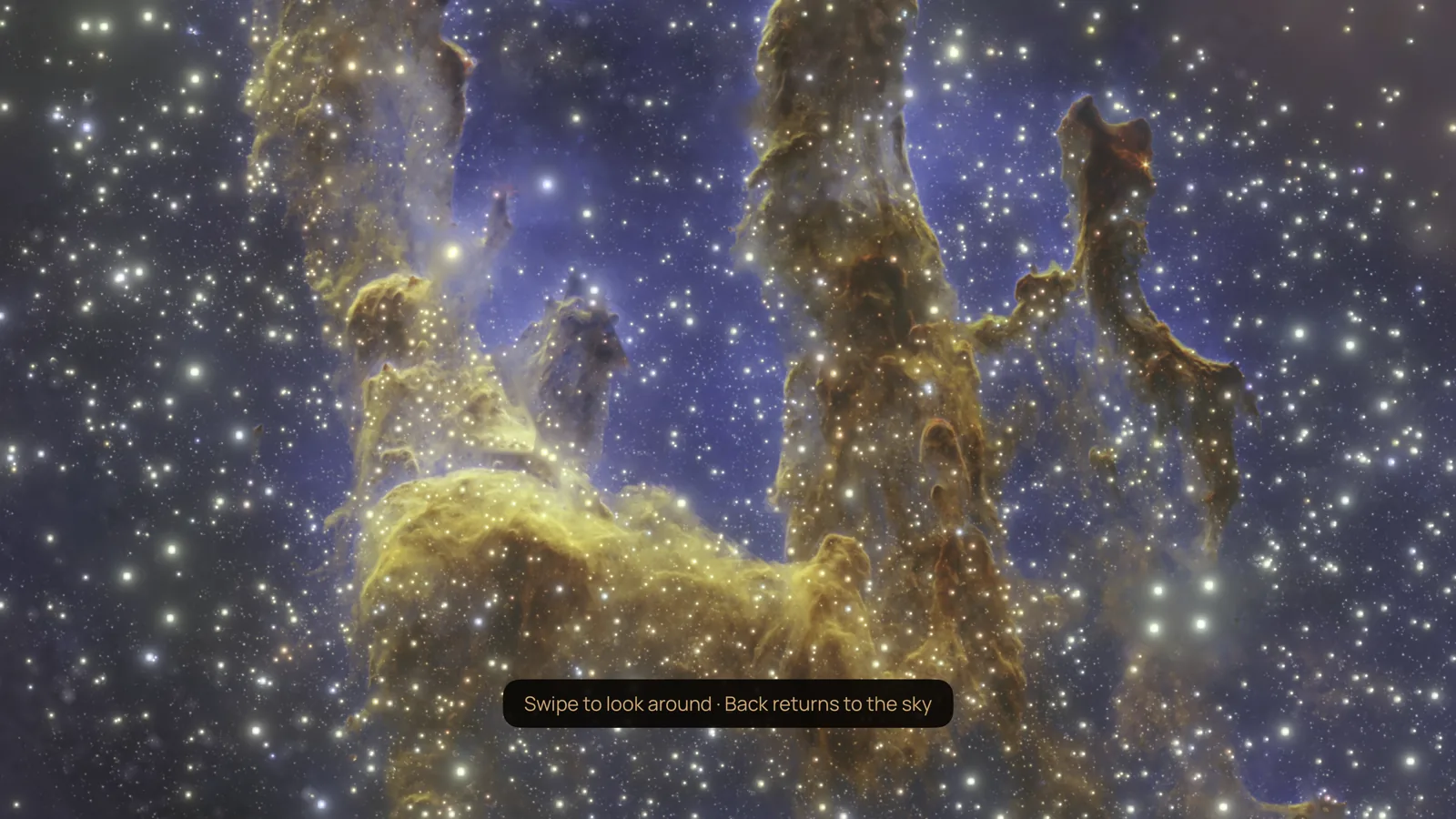
Everdust 1.1 for Apple TV came out on November 7, 2026, and it brings Night Sky to the big screen: the real sky over your city tonight, with the stars, planets, the Moon and the Milky Way where they really are. Swipe on the remote to look around, and click a nebula or galaxy to fly into real photographs of it from Hubble, Webb and other observatories, given depth. It's a free update on the App Store, with no ads and no account.
Night Sky is a part of Everdust. It isn't the Night Sky app by iCandi Apps, which is a different app from a different maker (I compare the two and the other Apple TV space apps in stargazing and space apps for Apple TV).
How do you open Night Sky?
Open Everdust and choose the Night Sky card ("Fly to tonight's wonders") in the For you row, or open Tonight's Sky and choose Night Sky: fly to tonight's wonders there. The sky opens on the place your Apple TV's time zone points to, such as "Los Angeles (from your time zone)". To change it, click and hold for the options and choose the place at the top: use your approximate location (to about 10 km, and it stays on the Apple TV), go back to your time zone's city, or pick a city from the list or type one.
The Siri Remote in Night Sky
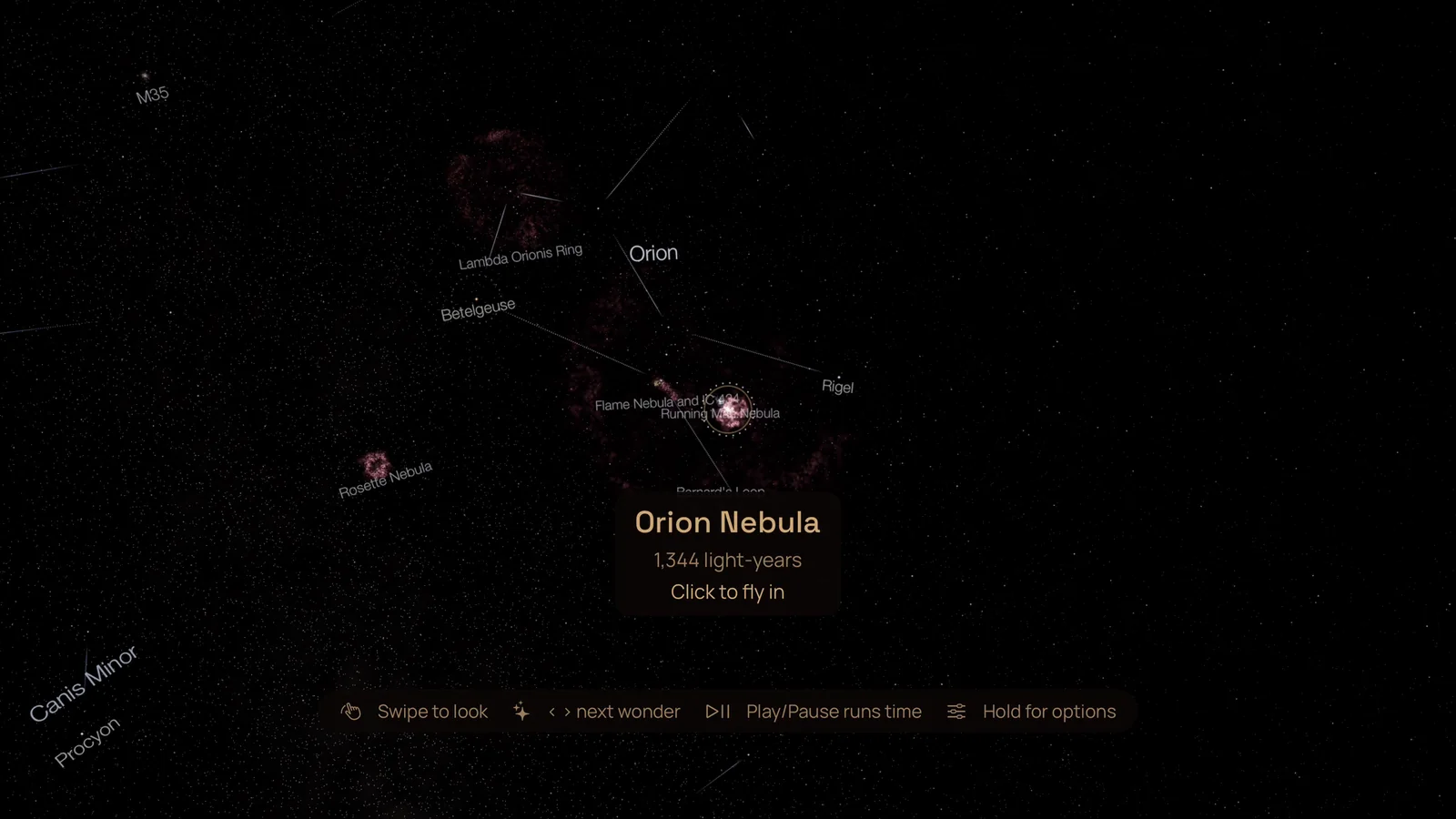
The middle of the screen is the aim. Whatever wonder is nearest it gets a ring and a name, with how far away it is, or how long sunlight takes to reach it for a planet.
| On the remote | In the sky | Inside a wonder |
|---|---|---|
| Swipe on the clickpad | Look around | Look around |
| Click | Fly to the wonder in the aim | |
| Press left or right on the clickpad | The previous or next wonder that's up | Change the era, where a wonder has more than one |
| Press up or down on the clickpad | Zoom in or out | |
| Play/Pause | Run time at ten minutes a second, or back to real time | |
| Click and hold | The options | |
| Back | Close Night Sky | Back to the sky |
The options
Click and hold anywhere in the sky for the options panel.
- The sky's clock: Fast backward and Run fast move an hour a second, Backward and Run ten minutes a second, and there's Pause time, Real time and Back to now.
- What to show: Names, Lines (the constellation figures), Planets and Wonders switch on and off. Star trails draw a long exposure of the stars' arcs over 1, 3 or 6 hours. Aurora set to real shows it when tonight's forecast for your place says it may be visible; set it to "shown here" and it appears anyway. Meteors fall at the real rate, ten times it, or not at all.
- Wonders: a row of every wonder the Apple TV can fly to, the ones up now first, each with how high it is and which way to face, then the ones below your horizon. Choose one and you fly straight there, even if it's under the ground for you tonight. Each wonder downloads the first time you visit it, and its card shows the size.
What can you fly into?
Nebulae, galaxies, star clusters, the planets, the Moon and the Sun. Among them are the Orion Nebula, the Pillars of Creation, the Andromeda Galaxy, the Crab Nebula, the Large and Small Magellanic Clouds, the Horsehead, the Ring, Helix and Butterfly nebulae, the Pleiades, and the black hole Cygnus X-1. The nebulae and galaxies are built from real telescope photographs, from Hubble, Webb, ESO and other observatories, given depth so you can move through them. The ones linked here have pages on this site, with when they're up and who took the pictures; there are more in the Everdust Atlas.
What to look for in the evenings, from now to the Geminids
These are for about 8 pm from mid-northern places such as the US and Europe, worked out with the Astronomy Engine library. Night Sky shows the right sky for wherever you are, so if you're farther south, look for yourself.
- Saturn is the bright steady point high in the south at 8 pm all through November, drifting toward the south-west by mid-December. Aim at it and click to fly to it.
- The Andromeda Galaxy is almost straight overhead in the early evening in November. It's a wonder: fly into it.
- The Pleiades climb in the east after dark, about a third of the way up by 8 pm in mid-November.
- Orion rises in the east around 8 pm in mid-November and is clear of the horizon by 10. By mid-December it's up in the east by 8. The Orion Nebula hangs below its belt; aim there and click.
- Jupiter rises in the east around 10 pm by mid-December.
- The Moon is full on November 24 and new again around December 9, so the second week of December has dark evenings.
- The Geminids peak on the night of December 13 to 14 under a thin crescent Moon that sets by about 9 pm: one of the better Geminid years. The meteors come from near Castor in Gemini, which is climbing in the north-east in the early evening, and the shower is best around 2 am. Find Gemini in Night Sky before you go out, then watch the real sky: when and where to look, with times for a few cities. The meteor shower calendar rates the coming showers for your city.
To check the planets for your own place right now, what's in my sky tonight works it out in your browser.
What does it need, and what's free?
Night Sky and every wonder are free in Everdust, with no ads and no account, and so is every other world, the music, all of The Story of Everything, and each game's first levels and daily level. Everdust Plus, optional, unlocks every Story chapter and game level: $4.99 a month, $29.99 a year (new subscribers get the first 7 days free) or $79.99 once in the US. One App Store purchase covers your Apple devices.
Version 1.1 needs tvOS 27, which runs on the Apple TV 4K (2nd generation, from 2021) and newer. It's the same App Store listing as Everdust for iPhone, iPad and Apple Vision Pro.
Is Night Sky on my other devices?
Yes. Night Sky is on Apple Vision Pro (since version 1.1), where the real sky surrounds you, and on iPhone and iPad (version 1.1) and Android (version 1.0.8), where you hold your phone up to the sky. More about everything else Everdust does on the TV, from Play all to the Siri Remote games: Everdust on Apple TV.
If something in Night Sky looks wrong on your TV, a star in the wrong place or a constellation drawn badly, tell me.
Questions people ask
Is there a night sky app for Apple TV? Yes. Everdust's Night Sky, since version 1.1 on November 7, 2026, shows the real sky over your city on Apple TV and flies you into its nebulae and galaxies, free. Night Sky by iCandi Apps, a different app, is a star map for Apple TV with guided tours.
How do I see tonight's sky on my TV? Open Everdust on Apple TV, choose the Night Sky card in For you, and swipe on the Siri Remote to look around. It shows the sky for your time zone's city, or for your approximate location or any city you pick.
Is Night Sky free on Apple TV? Yes. Night Sky and all its wonders are free in Everdust on Apple TV, with no ads and no account.
Can I watch the Geminid meteor shower on Apple TV? Night Sky shows where Gemini is tonight and can show meteors at their real rate, but the real shower is outside. In 2026 the Geminids peak on the night of December 13 to 14, with the Moon setting by about 9 pm, and they're best around 2 am.
Which Apple TV do I need? One that runs tvOS 27: the Apple TV 4K (2nd generation, from 2021) or newer. The Apple TV HD and the first Apple TV 4K stay on tvOS 26.
Is this the Night Sky app by iCandi Apps? No. Night Sky is a part of Everdust, made by me. iCandi Apps' Night Sky is a separate app.
Sources
- Everdust: Space Science Games on the App Store, and its Apple TV 1.1 release notes and listing, checked November 8, 2026.
- The controls and options as the Apple TV 1.1 app shows them, from the shipped build.
- Planet and star positions: Astronomy Engine by Don Cross, version 2.1.19, for 8 pm local time in New York, Los Angeles and London on November 15, November 29 and December 13, 2026.
- The Geminids: the International Meteor Organization's 2026 Meteor Shower Calendar, as worked through in the Geminid post.
- MacRumors, tvOS 27 drops support for two Apple TV models, citing Apple's documentation.
Get Everdust on every device
- Apple Vision ProDownload on the App StoreEverdust 1.1 for Apple Vision Pro: Night SkyEverdust is on Apple Vision Pro
- iPhone and iPadDownload on the App StoreEverdust is on iPhone and iPad
- Apple TVDownload on the App StoreNight Sky on Apple TV: tonight's real sky on the big screen (Everdust 1.1)Everdust is on Apple TV
- Android phones and tabletsGet it on Google PlayFree space science games for Android: Everdust on Google Play
- Meta Quest 3 and 3SGet it on the Meta Horizon StoreEverdust is on Meta Quest
- MacDownload for MacFree. Mac App Store version in review.
- Any web browserTry the worlds free
Free to download on every store, with no ads. Everdust Plus is optional: what it costs and where.