Everdust is on iPhone and iPad
Everdust is free on the App Store for iPhone and iPad, with no ads and no account: space science games you play with your fingers, narrated science stories, Night Sky (since version 1.1), Tonight's Sky, Calm and a particle universe simulator. What's free, what Everdust Plus costs and what to try first.
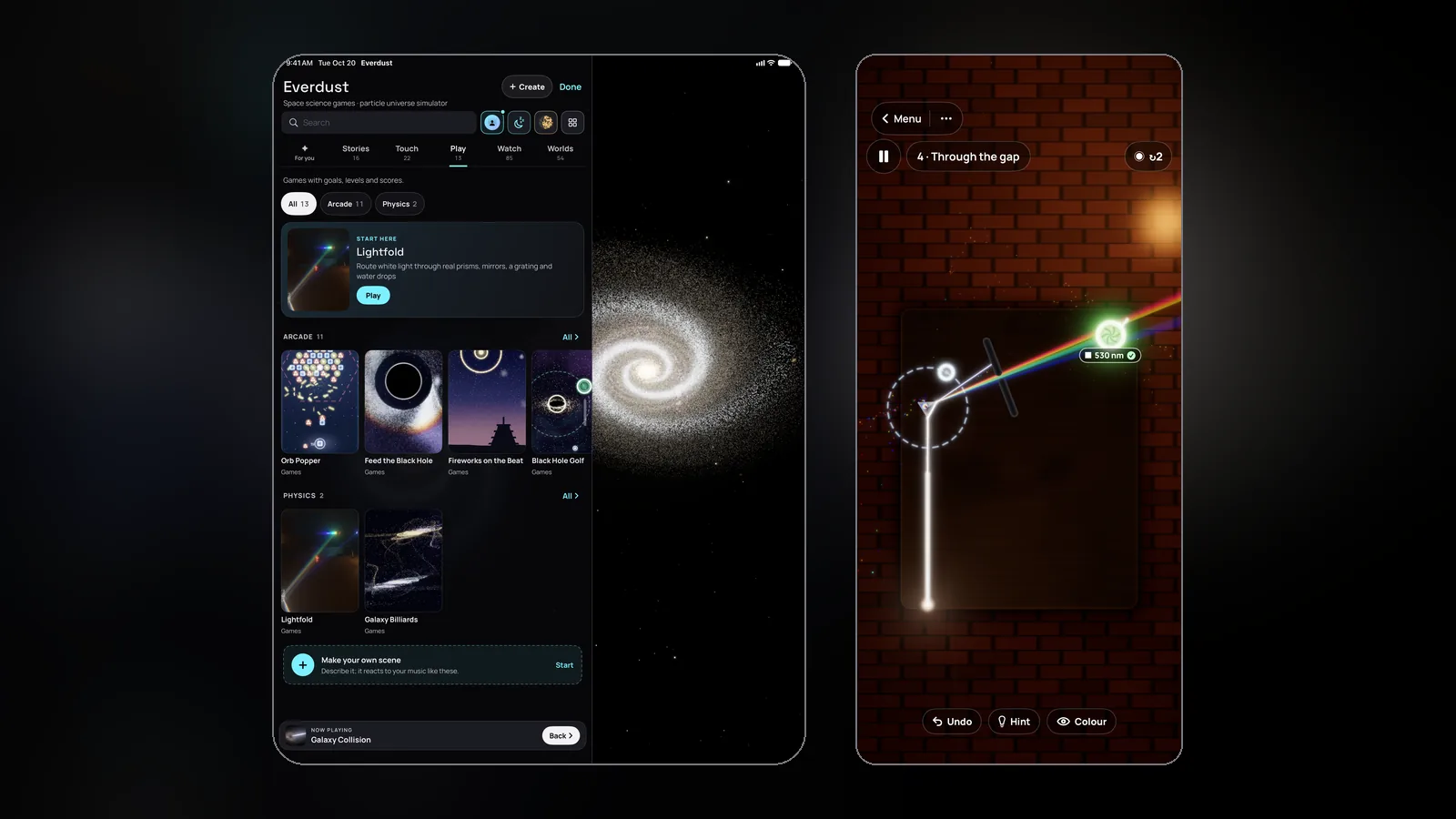
Everdust is on the App Store for iPhone and iPad, as of November 2, 2026. It's free to download, with no ads and no account: Everdust on the App Store.
It's one listing for every Apple device Everdust is on, so if you already have it on Apple Vision Pro or Apple TV, it's the same app, and anything you buy in it works on all of them.
Update, November 7, 2026: version 1.1 brings Night Sky to iPhone and iPad. Hold your phone up to the real sky where you are and tap a wonder, such as the Orion Nebula or the Pillars of Creation, to fly into it. What's new in 1.1.
What you can do on iPhone and iPad
Every world in Everdust is a live simulation made of particles, not a video. Stars, planets and galaxies move, glow and answer the moment you touch them.
Space games you play with your fingers. Quick games built on real physics, each with levels, stars to earn and a free daily level. In Feed the Black Hole you drag suns, comets and planets toward a hungry black hole and watch them get torn apart. In Lightfold you bend a sunbeam through prisms, mirrors and water drops until every crystal glows. Comet Rider, Black Hole Golf, Orbit Architect, Supernova Chain, Orb Popper, Topple and Fireworks on the Beat are in there too. Black Hole Hockey, Jet Versus and Murmuration Duet are for two players, on one screen or across two phones laid end to end.
Narrated science stories. River, Everdust's narrator, walks you through a big idea in chapters, from the first light after the Big Bang to a giant star collapsing and exploding as a supernova. Every chapter is a live simulation you can play with while River explains what you're seeing.
Tonight's Sky. What's up tonight where you are, in plain words: the Moon, the planets, meteor showers, the space station passing over, the aurora forecast and the clouds. It starts from your time zone's city; share your approximate location only if you want a closer forecast.
Calm. A sleep timer that slowly dims a scene as you drift off, breathing guides with a scene that breathes with you, a focus timer with a Live Activity on your Lock Screen, and guided NSDR (non-sleep deep rest) narrated by a calm voice.
A universe simulator in your hands. A galaxy collision of up to about a million stars, each one pulled by gravity, running live on your phone or tablet. Drag to orbit, pinch to zoom. The touch toys, such as Black Hole in Your Palm, Stir the Stars and Lightning in a Jar, are for when you just want to drag a finger through light.
Music, if you want it. Every scene can move with music, or on its own. Pick a song from Files, let Everdust listen to the room, tap the beat, or play music to it from another iPhone, iPad or Mac. The sound is analyzed on your device and never recorded or sent.
Create. On iPhone, step into the universe as particles with the selfie camera and cut a music video to the beat. Turn a photo into a field of particles, made on your device. Make a scene into a seamless video background for calls and streams, or a wallpaper. Walk into famous paintings by Van Gogh, Monet, Hokusai and others, every brush stroke at its own depth. Or describe a scene and Everdust designs it with AI, which uses Create credits.
Night Sky (since version 1.1, November 7, 2026). Hold your phone up and see the real sky where you are, right now: stars, planets, the Moon and the Milky Way where they really are, lined up with true north. Drag to look around, pinch to zoom, slide through tonight's hours. Tap the Orion Nebula, the Pillars of Creation, Andromeda, the Crab Nebula, the Magellanic Clouds and more to fly into real photographs from Hubble, Webb and other observatories, given depth; each world downloads the first time you visit it. Find it from Tonight's Sky, or in Tools. On Apple Vision Pro, the same sky is all around you.
What's free, and what does Everdust Plus cost?
Free, for everyone, with no time limit:
- Every scene, every touch toy and every music source.
- All of The Story of Everything, and the first chapters of every other Story.
- Each game's first levels and its daily level.
- Tonight's Sky.
- One full session of each Calm tool.
Everdust Plus is optional. It unlocks every Story chapter, every game level and every Calm session, and every plan adds 1 Create credit a month. In the US it's $4.99 a month, $29.99 a year (new subscribers get the first 7 days free) or $79.99 once for Lifetime; elsewhere the App Store shows the price in your currency. Create credit packs are on sale too: 10, 30 and 100 credits for $4.99, $11.99 and $29.99.
On the App Store one purchase covers your Apple devices, so Plus bought on your iPhone works on your iPad, Apple Vision Pro and Apple TV. To restore it, sign in with the Apple Account you bought with and choose Restore Purchases in the … menu › Everdust Plus. There are no ads, in the free version or with Plus.
What does it need?
iOS 17 or iPadOS 17 or later, per the App Store listing. The simulations run live on your device's graphics chip, which is why nothing in Everdust is a video: every galaxy collision is a new one.
A few things to try first
- Galaxy Collision. Pull two galaxies together and watch the tidal tails form.
- The Story of Everything. Free in full: put on headphones and let River start at the beginning.
- Lightfold. The quickest way to see why white light splits into a rainbow.
- Tonight's Sky. Then go outside and find the brightest planet it names.
If you'd like a taste first, several of the worlds run in a web browser at everdust.ai/play, free, with no install.
Everdust on other devices
- Apple Vision Pro: Everdust on the App Store, free. Version 1.1 added Night Sky. The Vision Pro launch post has what to try first.
- Apple TV: Everdust on the App Store, free, with an Ambient mode for the living room (Everdust on Apple TV).
- Android phones and tablets: Everdust on Google Play, free (what's in it).
- Meta Quest 3 and 3S: Everdust on the Meta Horizon Store, free (Everdust on Meta Quest).
- Mac: a free download from everdust.ai (version 1.0.1; macOS 14 Sonoma or later, Apple silicon (M1 or later)), signed and notarized by Apple. The Mac App Store version is in review.
If something breaks or feels wrong on your iPhone or iPad, tell me and include the model.
Questions people ask
Is Everdust free on iPhone? Yes. It's free on the App Store for iPhone and iPad, with no ads and no account. Every scene, toy and music source is free, and so are all of The Story of Everything, each game's first levels and daily level, Tonight's Sky and one session of each Calm tool. Everdust Plus unlocks the rest.
How much is Everdust Plus on iPhone? In the US, $4.99 a month, $29.99 a year with a 7-day free trial for new subscribers, or $79.99 once for Lifetime. One App Store purchase covers your iPhone, iPad, Apple Vision Pro and Apple TV.
Are there two-player games in Everdust? Yes. Black Hole Hockey, Jet Versus and Murmuration Duet are for two players, on one screen or across two phones laid end to end.
Does Everdust on iPhone have Night Sky? Yes, since version 1.1 (November 7, 2026). Hold your phone up to see the real sky where you are, lined up with true north, and tap a nebula, a galaxy or a planet to fly into it. Tonight's Sky still tells you what's up tonight where you are, in plain words.
Sources
- Everdust: Space Science Games on the App Store (the iPhone and iPad description, free tier, requirements and in-app purchases), checked November 4, 2026.
- Everdust's updates and support pages; the iOS 1.1 What's New on the App Store (Night Sky), November 7, 2026.
Get Everdust on every device
- Apple Vision ProDownload on the App StoreEverdust 1.1 for Apple Vision Pro: Night SkyEverdust is on Apple Vision Pro
- iPhone and iPadDownload on the App StoreEverdust is on iPhone and iPad
- Apple TVDownload on the App StoreEverdust is on Apple TV
- Android phones and tabletsGet it on Google PlayFree space science games for Android: Everdust on Google Play
- Meta Quest 3 and 3SGet it on the Meta Horizon StoreEverdust is on Meta Quest
- MacDownload for MacFree. Mac App Store version in review.
- Any web browserTry the worlds free
Free to download on every store, with no ads. Everdust Plus is optional: what it costs and where.