Everdust 1.1 for Apple Vision Pro: Night Sky
Everdust 1.1 for Apple Vision Pro puts the real night sky all around you, from home or from some of the darkest places on Earth. Look at a planet or a nebula and pinch to fly there. What's real in it, what's a model, what else is new in 1.1, and what's free.
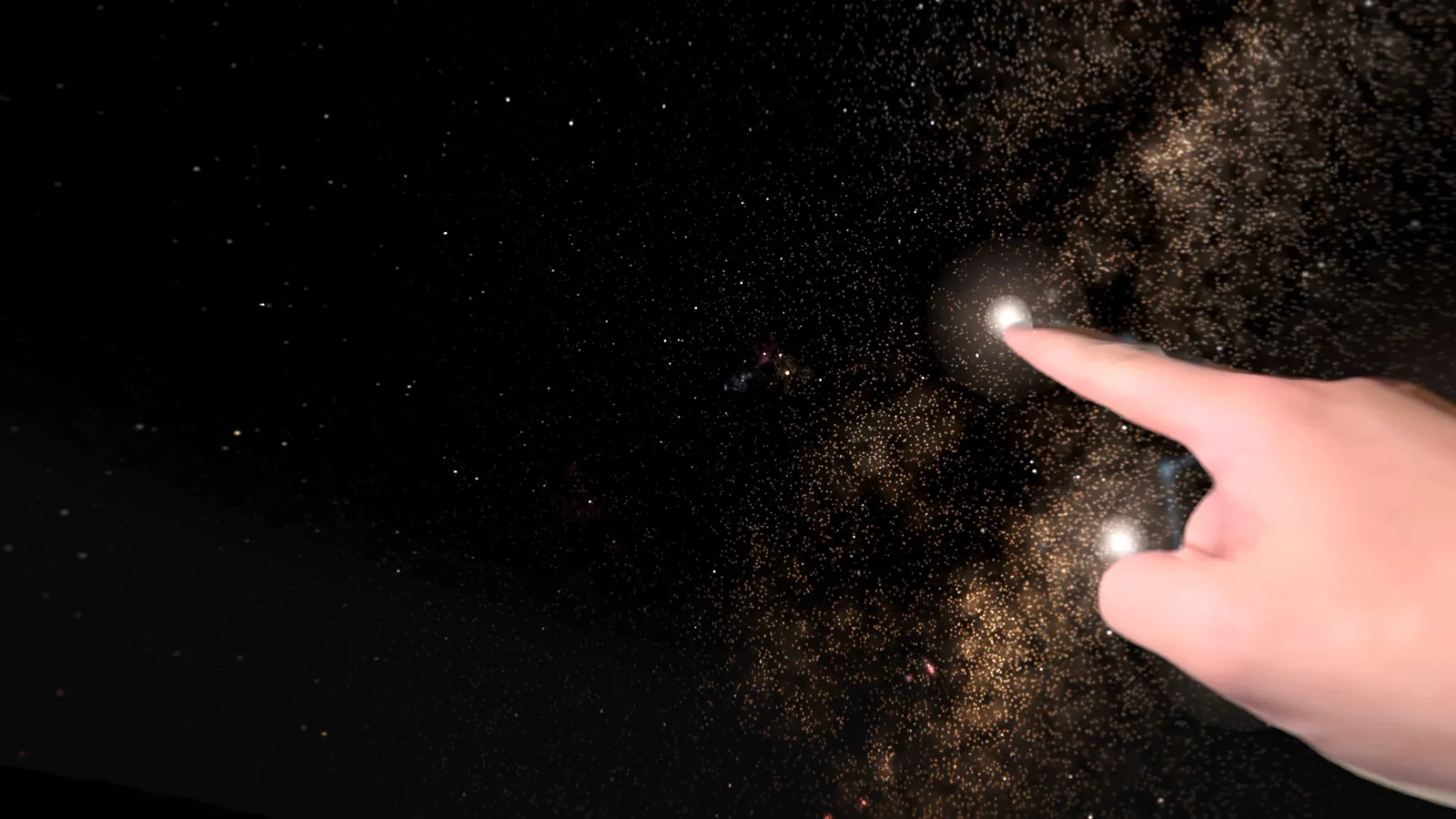
Everdust 1.1 for Apple Vision Pro came out on November 3, 2026, and its biggest new thing is Night Sky: the real night sky all around you, from home or from some of the darkest places on Earth. It's a free update on the App Store.
Night Sky is a part of Everdust. It isn't the Night Sky star-map app by iCandi Apps, which is a different app from a different maker.
What is Night Sky?
Stand in your room, open Night Sky, and the room is replaced by the sky over where you are, right now. Every star the naked eye can see under a dark sky is there, about 8,900 of them from the HYG star catalogue down to magnitude 6.5, each at its true direction for your place and time, with its true brightness and color. The sky turns at the Earth's real rate, 15° an hour, so it looks still. Leave it and come back later to see how far it has moved, or set it to Still.
- Fly there. Look at a planet, the Sun or a deep-sky wonder and pinch, and you fly to it. Grab Saturn or Jupiter and turn it in your hands.
- Deep-sky wonders. Real photographs from Webb, Hubble, ESO and other observatories, given depth so you can fly into them: the Pillars of Creation, the Horsehead, the Crab Nebula with a slider back to the supernova of 1054, and more. Hold a nebula in your hands and turn it while the sky stays still. Each wonder's Learn card says when it's up tonight from where you are and credits its photographs. Every one has a page in the Everdust Atlas.
- Time. Turn the dial at hand height to pick a time up to 12 hours ahead or back, and let go: each star glides to its new place instead of the whole sky spinning. The panel picks any date. Star trails draw a long exposure of the stars' arcs round the pole.
- Find a constellation. Constellation lines and names are on by default, with the names of the 21 brightest stars; each switches off. Find lights one figure and draws a soft arc from where you're looking to it, and tells you if it's below the horizon and when it rises. Look at a named star and pinch to learn about it.
- Choose how dark the sky is. Sky quality goes from a true dark site (Bortle 1) to a city sky (Bortle 9): the glow brightens, light domes rise from the horizon, the faint stars go and the Milky Way fades. It's the quickest way I know to see what light pollution takes away.
- Places. Watch from one of the world's great dark-sky sites, such as the Atacama, Maunakea, NamibRand, Aoraki Mackenzie or La Palma, or from where the aurora is seen, such as a fjord by Tromsø, Abisko or Yellowknife. The sky is the one over that place. Turn on the aurora and see it there.
- The Moon and planets show their real phase, brightness and color, from the same calculations as Tonight's Sky, and moonlight brightens the sky and hides the faint stars, as it does.
What's a model, not a photograph
Vision Pro gives apps no compass, so Night Sky starts with a guess and asks you once to face north and pinch (Align north); it remembers that for the room. The Milky Way's band is a model of our galaxy's light and dust seen from the Sun's place in it, laid where the real band lies, not a photograph. The ground at each place is our own model, made for that place. And no headset can show a real sky's range of light: the stars keep their true ratios to each other, but a dark site under a real sky is still better. Night Sky says all of this in its own Learn card.
If you want to know more about what a headset can and can't show of the sky, I wrote a longer guide to seeing the real night sky in VR, with the other apps that do it.
What else is new in 1.1
- Solar System to Scale: walk out from the Sun to Neptune with every size and distance true, from NASA's fact sheets. Choose how big the Sun is, from a marble to a person, and everything else follows.
- A new home: every world behind doors for Night Sky, Play, Stories, Music Visualizers and more, with Start here on your first visit. The old layout is still there as Classic home in the ⋯ menu.
- The Laser Show, rebuilt: lasers all around and above you play to your music, and nothing strobes.
- Calm: guided rest (NSDR), now also as a slow drift down a glowing river, plus breathing, a sleep timer and a focus timer.
- A small ? in every world shows what your hands can do. A Handful is free all the way to its end, and pendulums come in 3D with ribbons of light.
The full list is on the updates page.
What's free
Night Sky and all its wonders are free, and so are Solar System to Scale, every world, every music source and all of The Story of Everything. Fireworks, Galaxy Billiards, Black Hole Golf, Lightfold, Orb Popper and A Handful are free in full, and every other game's first level is free. Everdust Plus, optional, unlocks the rest of every Story and game and the longer Calm sessions: $4.99 a month, $29.99 a year (new subscribers get the first 7 days free) or $79.99 once, in US dollars. One App Store purchase covers your Apple devices. No ads.
The cover is my own headset recording of Night Sky, from a test build a few days before release.
Is Night Sky on my other devices?
Yes, on phones and tablets too. Since November 7, 2026, Night Sky is on iPhone and iPad (version 1.1) and Android (version 1.0.8): hold your phone up to see the real sky where you are, and tap a wonder to fly into it. On Meta Quest, Night Sky comes in a later update.
Everdust is also free on Apple TV. On Mac, Everdust is a free download from everdust.ai (version 1.0.1; macOS 14 Sonoma or later, Apple silicon (M1 or later)); the Mac App Store version is in review. The original Vision Pro launch post has more on what Everdust is in the headset.
If something in Night Sky looks wrong, a star in the wrong place or a constellation drawn badly, tell me.
Questions people ask
What is Night Sky in Everdust? A part of Everdust for Apple Vision Pro, since version 1.1: the real night sky all around you for your place and time, about 8,900 naked-eye stars at their true positions. Look at a planet or a deep-sky wonder and pinch to fly there. It's free. Since November 7, 2026 it's on iPhone, iPad and Android too, where you hold up your phone and tap a wonder to fly there. It isn't the Night Sky app by iCandi Apps.
Is Everdust's Night Sky free? Yes. Night Sky and all its deep-sky wonders are free in Everdust on Apple Vision Pro, with no ads.
Is the Milky Way in Night Sky a photograph? No. It's a model of our galaxy's light and dust seen from the Sun's place in it, laid where the real band lies in the sky. The stars are real catalogue stars, and the deep-sky wonders are real telescope photographs given depth.
Does Night Sky work without knowing which way is north? It starts facing south along the direction you're looking, as a guess, because Vision Pro gives apps no compass. Face north and pinch once (Align north) and it lines the sky up with the real one, and remembers it for that room.
Sources
- Everdust: Space Science Games on the App Store (the Apple Vision Pro 1.1 description and What's New), checked November 4, 2026.
- Hipparcos, Yale and Gliese stars: the HYG database by David Nash (CC BY-SA 4.0), version 4.0, the star catalogue Night Sky draws.
- Schaefer, B. E., Telescopic limiting magnitudes, Publications of the Astronomical Society of the Pacific 102, 212 (1990), for how the faintest visible star follows the sky's brightness.
- Everdust's updates page.
Get Everdust on every device
- Apple Vision ProDownload on the App StoreEverdust 1.1 for Apple Vision Pro: Night SkyEverdust is on Apple Vision Pro
- iPhone and iPadDownload on the App StoreEverdust is on iPhone and iPad
- Apple TVDownload on the App StoreEverdust is on Apple TV
- Android phones and tabletsGet it on Google PlayFree space science games for Android: Everdust on Google Play
- Meta Quest 3 and 3SGet it on the Meta Horizon StoreEverdust is on Meta Quest
- MacDownload for MacFree. Mac App Store version in review.
- Any web browserTry the worlds free
Free to download on every store, with no ads. Everdust Plus is optional: what it costs and where.