Everdust is on Apple TV
Everdust is free on the App Store for Apple TV, with no ads: an Ambient mode that plays live particle worlds hands off like a screen saver, narrated science stories, space games for the Siri Remote and music for the living room. What's free, what Everdust Plus costs and what to try first.
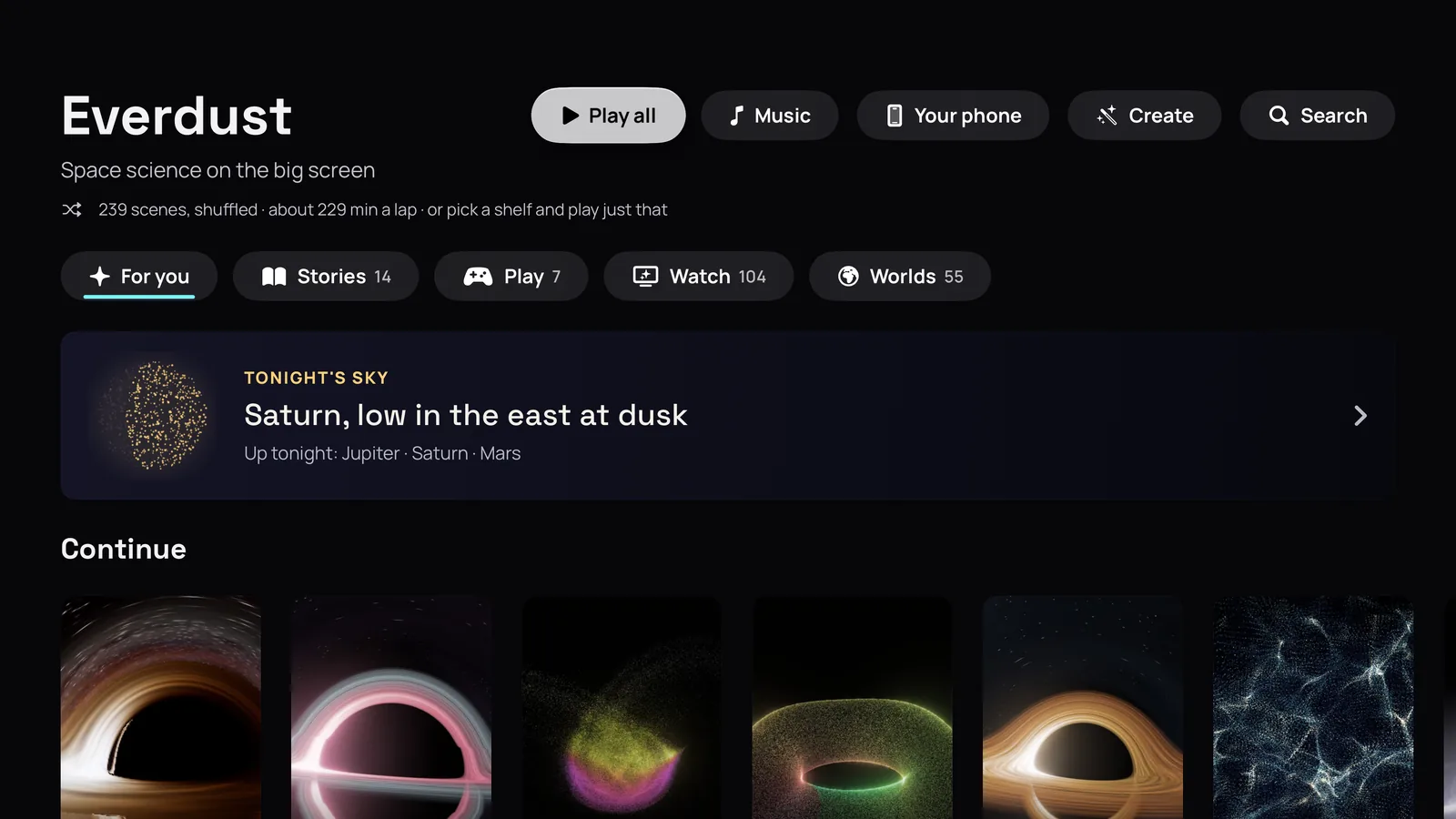
Everdust is on the App Store for Apple TV, as of October 30, 2026. It's free to download, with no ads: Everdust on the App Store. On your Apple TV, open the App Store and search for Everdust.
It's the same listing as Everdust for iPhone, iPad and Apple Vision Pro, so a purchase on one of them works on your Apple TV too.
What it is on the big screen
Every world in Everdust is a live simulation made of particles, not a video, and each one can move with your music. Galaxies collide with up to about a million stars, black holes bend the light, ferrofluid spikes with the bass and a slime mold finds its way.
Ambient mode. Choose Play all and leave it running: Everdust takes a slow, shuffled lap through the worlds, each for its own length, hands off, while the scenes turn slowly all the way round. Apple TV doesn't let apps add screen savers, so this is how you get one: more on that here.
Narrated science stories. Sit back and let River, Everdust's narrator, walk through a big idea in chapters, from the first light after the Big Bang to the last stars. Every chapter is a live simulation while River explains what you're seeing.
Space games for the Siri Remote. Feed the Black Hole, Fireworks on the Beat, Black Hole Golf and Orb Popper, each with levels, stars to earn and a free daily level. Swipe to steer and aim, click to play. Or unwind with the toys Stir the Stars and Firefly Synchrony.
Music for the living room. Stream free Mixes from independent artists, play music to your Apple TV from any app on your iPhone, or let the scenes move on their own. Everdust on your iPhone can also listen to the room and send just the beat. The sound is analyzed live and never recorded.
Make it yours. Walk into famous paintings by Van Gogh, Monet, Hokusai and others. Describe a scene with the remote or your voice and Everdust designs it, or turn the people in your photos into living particles, right on your Apple TV. Those two use Create credits.
What's free, and what does Everdust Plus cost?
Free, for everyone: every world, toy and music source, each game's first levels and its daily level, all of The Story of Everything and the first chapters of every other Story. No ads.
Everdust Plus is optional. It unlocks every Story chapter and every game level, and every plan adds 1 Create credit a month. In the US it's $4.99 a month, $29.99 a year (new subscribers get the first 7 days free) or $79.99 once; elsewhere the App Store shows its own price. Create credit packs are on sale too: 10, 30 and 100 credits for $4.99, $11.99 and $29.99. One App Store purchase covers your Apple devices. On Apple TV, click and hold, then choose Everdust Plus to buy or restore it.
What does it need?
tvOS 17 or later, per the App Store listing.
A few things to try first
- Play all. Put it on when friends come round, or at the end of the day, and don't touch the remote.
- The Story of Everything. Free in full, and best on a big screen with the sound up.
- Feed the Black Hole. Swipe a star toward the hole and watch the tidal disruption.
- Play music to it from your iPhone. Any app, any song: the worlds follow it.
Everdust on other devices
- Apple Vision Pro: Everdust on the App Store, free (launch post; Night Sky in 1.1).
- iPhone and iPad: Everdust on the App Store, free (Everdust on iPhone and iPad).
- Android phones and tablets: Everdust on Google Play, free (what's in it). Google TV and Android TV are coming soon.
- Meta Quest 3 and 3S: Everdust on the Meta Horizon Store, free (Everdust on Meta Quest).
- Mac: a free download from everdust.ai (version 1.0.1; macOS 14 Sonoma or later, Apple silicon (M1 or later)), signed and notarized by Apple. The Mac App Store version is in review. There's also a free Everdust Screen Saver for Mac.
If something breaks or feels wrong on your TV, tell me.
Questions people ask
Is Everdust free on Apple TV? Yes. It's free on the App Store for Apple TV, with no ads. Every world, toy and music source is free, and so are all of The Story of Everything and each game's first levels and daily level. Everdust Plus unlocks the rest.
Can Everdust be my Apple TV screen saver? Not as a system screen saver: Apple TV only offers Apple's own screen saver types. Choose Play all in Everdust instead and it plays its worlds one after another, hands off, like a screen saver.
Can I play games on Everdust for Apple TV? Yes, with the Siri Remote: Feed the Black Hole, Fireworks on the Beat, Black Hole Golf and Orb Popper, each with free levels and a free daily level.
Does Everdust on Apple TV play music? Yes. Stream free Mixes from independent artists, or play music to your Apple TV from any app on your iPhone, and the worlds move with it.
Sources
- Everdust: Space Science Games on the App Store (the Apple TV description, free tier, requirements and in-app purchases), checked November 4, 2026.
- Apple Support, Adjust screen saver settings on Apple TV.
- Everdust's updates and support pages.
Get Everdust on every device
- Apple Vision ProDownload on the App StoreEverdust 1.1 for Apple Vision Pro: Night SkyEverdust is on Apple Vision Pro
- iPhone and iPadDownload on the App StoreEverdust is on iPhone and iPad
- Apple TVDownload on the App StoreEverdust is on Apple TV
- Android phones and tabletsGet it on Google PlayFree space science games for Android: Everdust on Google Play
- Meta Quest 3 and 3SGet it on the Meta Horizon StoreEverdust is on Meta Quest
- MacDownload for MacFree. Mac App Store version in review.
- Any web browserTry the worlds free
Free to download on every store, with no ads. Everdust Plus is optional: what it costs and where.