A free live space screensaver for Mac, and what to run on Apple TV
Everdust Screen Saver is a free Mac screen saver where galaxies collide, a black hole spins and starlings flock, all simulated live. Apple TV doesn't take third-party screen savers, so there Everdust's Ambient mode does the same job.
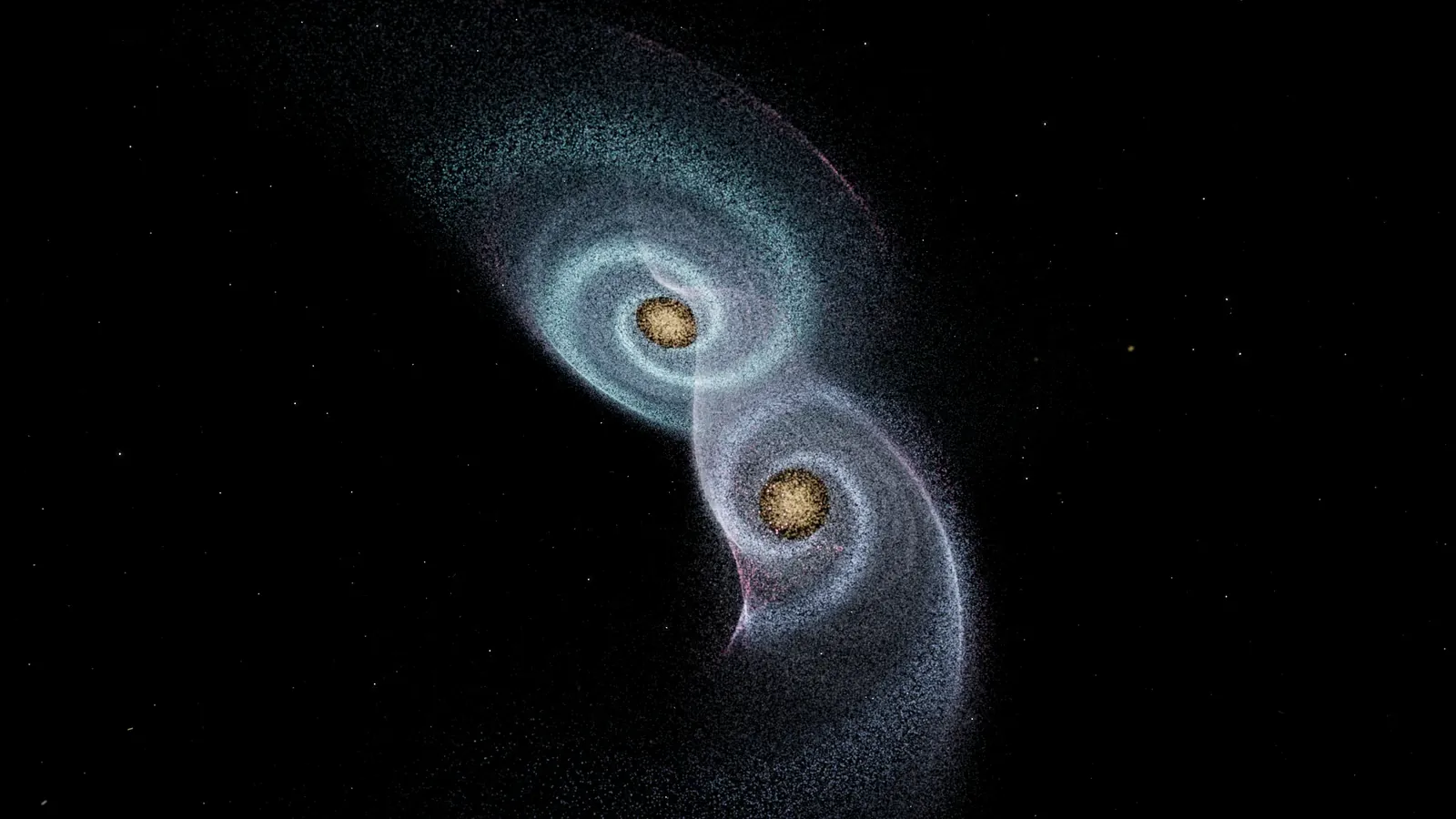
Everdust Screen Saver is a free screen saver for Mac in which two galaxies collide, a spinning black hole bends light and a flock of starlings swirls, each one a real simulation running live while your Mac is idle; on Apple TV, the Everdust app's Ambient mode plays the same kind of worlds one after another.
Most screen savers are videos or slideshows. This one isn't. Nothing is pre-recorded, so the galaxies never merge the same way twice. You can download it free, with no account.
What is in the Everdust Screen Saver?
Open the screen saver's Options and pick a scene, or let them rotate with a slow fade:
- Galaxy Collision. Two spiral galaxies swing past each other, fling out long tidal tails and merge, then a new pair arrives.
- Kerr Black Hole. A spinning black hole with a glowing disk, its gravity bending the light from behind it.
- Strange Attractors. Particles tracing chaotic flows that never repeat but always keep the same shape.
- Murmuration. A flock of starlings turning together like a single living cloud.
- More scenes, or Rotate through all of them.
It is silent and never listens: the scenes move on their own. It needs macOS 14 Sonoma or later on a Mac with Apple silicon (M1 or later). It is signed and notarized by Apple.
How do you install a screen saver on a Mac?
- Download EverdustSaver.zip from everdust.ai/screensaver and open it to get EverdustSaver.saver.
- Double-click EverdustSaver.saver. macOS asks whether to install it for you or for everyone on the Mac; either works.
- Pick Everdust in System Settings › Screen Saver. On newer versions of macOS it's under System Settings › Wallpaper › Screen Saver, in the Other section.
- Choose a scene with Options, or pick Rotate.
To remove it, delete EverdustSaver.saver from the Screen Savers folder in your Library (Finder › Go › Library), or from /Library › Screen Savers if you installed it for everyone.
Can you get it on Apple TV?
Not as a screen saver, and no app can offer one. Apple TV's screen saver is chosen in Settings › Screen Saver from Apple's own types: Aerials, Memories & Slideshows, Portraits and Snoopy. Apps can't add their own.
What you can do is run the Everdust app on Apple TV and turn on Ambient mode: choose Play all, and the worlds play one after another, hands off, each for its own length, with the app keeping the screen awake. It's the same engine as the screen saver, on the biggest screen in the house. Everdust for Apple TV is on the App Store, free, since October 30, 2026: what else it does on Apple TV.
The Everdust app on Mac does more than the screen saver: every world can move with whatever your Mac is playing, full screen or out to a TV or projector, with games and narrated Stories.
What science is on screen?
Each scene is built on real physics, simplified where it has to be to run live.
Galaxy collisions. In 1972, Alar and Juri Toomre showed that the long tails of real colliding galaxies come from gravity alone. Each galaxy pulls harder on the near side of the other than on the far side, and that difference, the tidal force, stretches the disks into tails and bridges. The stars themselves almost never hit each other, because the gaps between them are enormous.
Spinning black holes. In 1963 the mathematician Roy Kerr found the exact solution of Einstein's equations for a spinning black hole. Real black holes spin, and a spinning one drags space around with it, which lets its disk of gas orbit closer in before it falls. The disk looks lopsided, brighter on the side whose gas is rushing toward you, and the black hole's gravity bends light from the far side of the disk up over the top, so you see the back of the disk too.
Starling murmurations. No starling leads the flock. In 2008, a team of physicists filmed starling flocks over Rome in 3D and found that each bird keeps track of a fixed number of neighbors, about six or seven, whatever the distance between them. That simple rule keeps the flock together even when a hawk scatters it.
Strange attractors. The flows come from short sets of equations, such as the one the meteorologist Edward Lorenz found in 1963 while modeling air. They are completely deterministic, yet the paths never repeat: the root of the butterfly effect.
Try the worlds without installing anything
Several of these run in a web browser too: Galaxy Collision and Strange Attractors at everdust.ai/play, free.
- Mac: the Everdust Screen Saver, free.
- The Everdust app on Mac: a free download from everdust.ai (version 1.0.1; macOS 14 Sonoma or later, Apple silicon (M1 or later)), signed and notarized by Apple. The Mac App Store version is in review.
- Apple TV, iPhone, iPad and Apple Vision Pro: Everdust on the App Store, free (Apple TV, iPhone and iPad, Apple Vision Pro).
- Android phones and tablets: Everdust on Google Play, free.
- Meta Quest 3 and 3S: Everdust on the Meta Horizon Store, free.
Sources
- Apple Support, Use a screen saver on your Mac and Adjust screen saver settings on Apple TV.
- Kerr, R. P., Gravitational Field of a Spinning Mass as an Example of Algebraically Special Metrics, Physical Review Letters 11, 237 (1963).
- Ballerini, M. et al., Interaction ruling animal collective behavior depends on topological rather than metric distance, PNAS 105, 1232–1237 (2008).
- Toomre, A. and Toomre, J., Galactic Bridges and Tails, The Astrophysical Journal 178, 623 (1972).