Space Vision vs Everdust
Is Space Vision or Everdust better on Apple Vision Pro? For learning how the solar system moves, Space Vision is better: Visionly built it only for Vision Pro, as a real-time solar system on NASA JPL data that you can run a century forward or back, with Space Missions on NASA SPICE data (Voyager 1 free; Voyager 2 and New Horizons with SV+). Everdust is better if you want the real night sky around you and to fly into it: pinch a planet or a nebula to fly there, walk the Solar System to Scale, and reach into galaxy collisions and black holes. Both are free to download with an optional subscription, so you can try both.
- Pick Space Vision to understand orbits and follow real spacecraft, with a guide, ranks and a leaderboard as you learn.
- Pick Everdust for the real sky around you, flights into nebulae and galaxies, and physics you can touch, on Vision Pro and your other devices.
Side by side
| Feature | Space Vision | Everdust |
|---|---|---|
| Made by | Visionly[1] | Decosa, Inc. (we make it)[2][3] |
| Devices | Apple Vision Pro only (visionOS 26 or later)[1] | Out now: Apple Vision Pro, Apple TV, Android phones and tablets, iPhone, iPad and Meta Quest 3 and 3S. Mac: a free download from everdust.ai/mac (Mac App Store version in review).[2][3] |
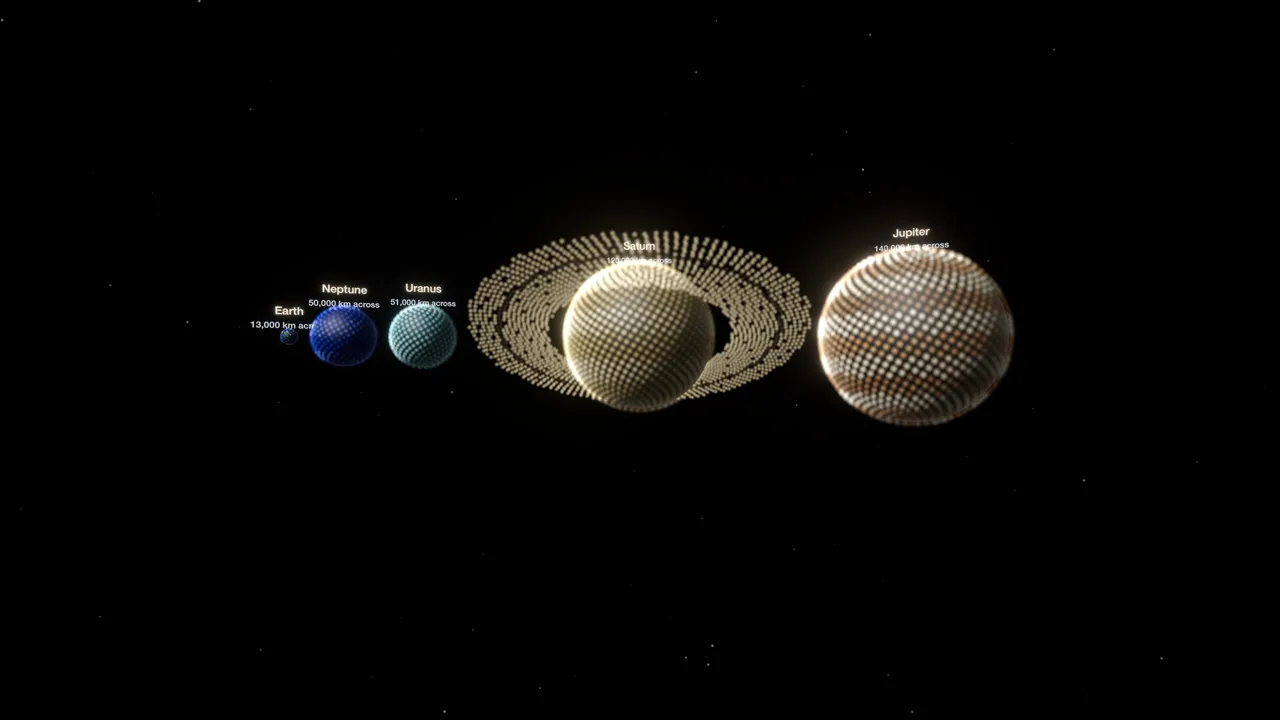
| Solar system | Real-time orbits on NASA JPL ephemeris data; 40+ planets, dwarf planets and moons; a century forward or back; teleport between bodies[1][4] | Solar System to Scale: the Sun to Neptune with every size and distance true, from NASA's fact sheets; pinch a planet in the night sky to fly there and turn it in your hands[2][3] |
| Beyond it | Space Missions on NASA SPICE data: Voyager 1 free; Voyager 2 and New Horizons with SV+; spacecraft scaled up to life size[1] | The real night sky for your place and time; flights into nebulae, galaxies and star clusters from real Webb, Hubble and ESO photographs; galaxy collisions, black holes, physics games and narrated science Stories[2][5] |
| Learning | Soluna, a guide (full AI-assisted learning with SV+); Knowledge Points, ranks and a global leaderboard[1] | A Learn card for each wonder, with when it's up tonight; narrated science Stories[2][3] |
| Price | Free: the solar system with 16 planets and moons, and Voyager 1. SV+ $9.99 a month or $99.99 a year[1] | Free. Everdust Plus is optional: $4.99 a month, $29.99 a year or $79.99 once (US).[2][3] |
| Languages | English[1] | English, German, Japanese, Korean and Spanish[2][3] |
Each app as its own store listing or website describes it, checked November 9, 2026; US prices. Numbers in brackets are the sources below.
Where Space Vision is the better pick
- Real orbital motion on NASA JPL data, a century forward or back.
- Real missions on NASA SPICE data, with spacecraft at life size.
- Learning as a game: Soluna, Knowledge Points, ranks and a leaderboard.
Where Everdust is the better pick
- The real night sky around you, with flights into its nebulae and galaxies.
- Simulations you reach into: galaxy collisions of up to about a million stars, black holes that bend light.
- Also on iPhone, iPad, Mac, Apple TV, Android and Meta Quest.
Where Everdust fits
We make Everdust, so weigh that. Everdust has no spacecraft missions or orbital-mechanics lessons; if that's what you want, Space Vision is the better pick.
Other Space Vision alternatives on Vision Pro, from their own listings: Night Sky has a Grand Orrery with Night Sky +, Caelum has a 3D solar system mode, and Sky Guide is a calm sky show. The four-app comparison has them side by side.
The free version covers every world and toy, The Story of Everything in full, and each game's first 3 levels or more and its daily level; Everdust Plus unlocks the rest.
Everdust is free on Apple Vision Pro, Apple TV, Android phones and tablets, iPhone, iPad and Meta Quest. On Mac, it’s a free download; the Mac App Store version is in review.
Everdust on the App Store for Apple Vision ProGet it on Google PlayEverdust on the App Store for iPhoneEverdust on the App Store for iPadEverdust on the App Store for Meta Quest
Questions people ask
Is Space Vision free? Yes to download: the free version has the solar system with 16 planets and moons and the Voyager 1 mission. SV+ ($9.99 a month or $99.99 a year) adds Voyager 2, New Horizons, all the planets, moons and dwarf planets, and Soluna's full AI-assisted learning.
Is Space Vision on iPhone or Android? No. Space Vision is built only for Apple Vision Pro (visionOS 26 or later). Everdust is on Vision Pro, iPhone, iPad, Mac, Apple TV, Android and Meta Quest.
What are some Space Vision alternatives on Vision Pro? Everdust (made by us) for the real night sky and flights into nebulae, Night Sky for a guided planetarium with a Grand Orrery (Night Sky +), Caelum for the sky around you with a 3D solar system mode, and Sky Guide for a calm sky show.
Is Space Vision or Everdust better? Space Vision is better for learning orbital mechanics and following real spacecraft. Everdust is better for being inside the night sky, flying into nebulae, and touching galaxy and black hole simulations. Both are free to try.
Sources
- Space Vision: Learn Astronomy on the App Store
- Everdust on the App Store
- Everdust on Google Play
- Space Vision's site (thespacevision.com)
- Everdust 1.1 for Apple Vision Pro: Night Sky (what's in it, and what's a model)
Checked November 9, 2026. Prices and features change; the store listing is always the final word. We make Everdust, and we’ve tried to describe the other apps as fairly as their makers do.