Relaxing space apps for Apple Vision Pro (2026): an honest guide
The calmest ways to be in space with an Apple Vision Pro, from Apple's own Moon and Jupiter environments to a starry planetarium with spoken tours, Earth through a space station's window, and the real night sky from a dark-sky site with a sleep timer. What each one does and costs, from its own App Store listing or Apple's guide, by the maker of one of them.
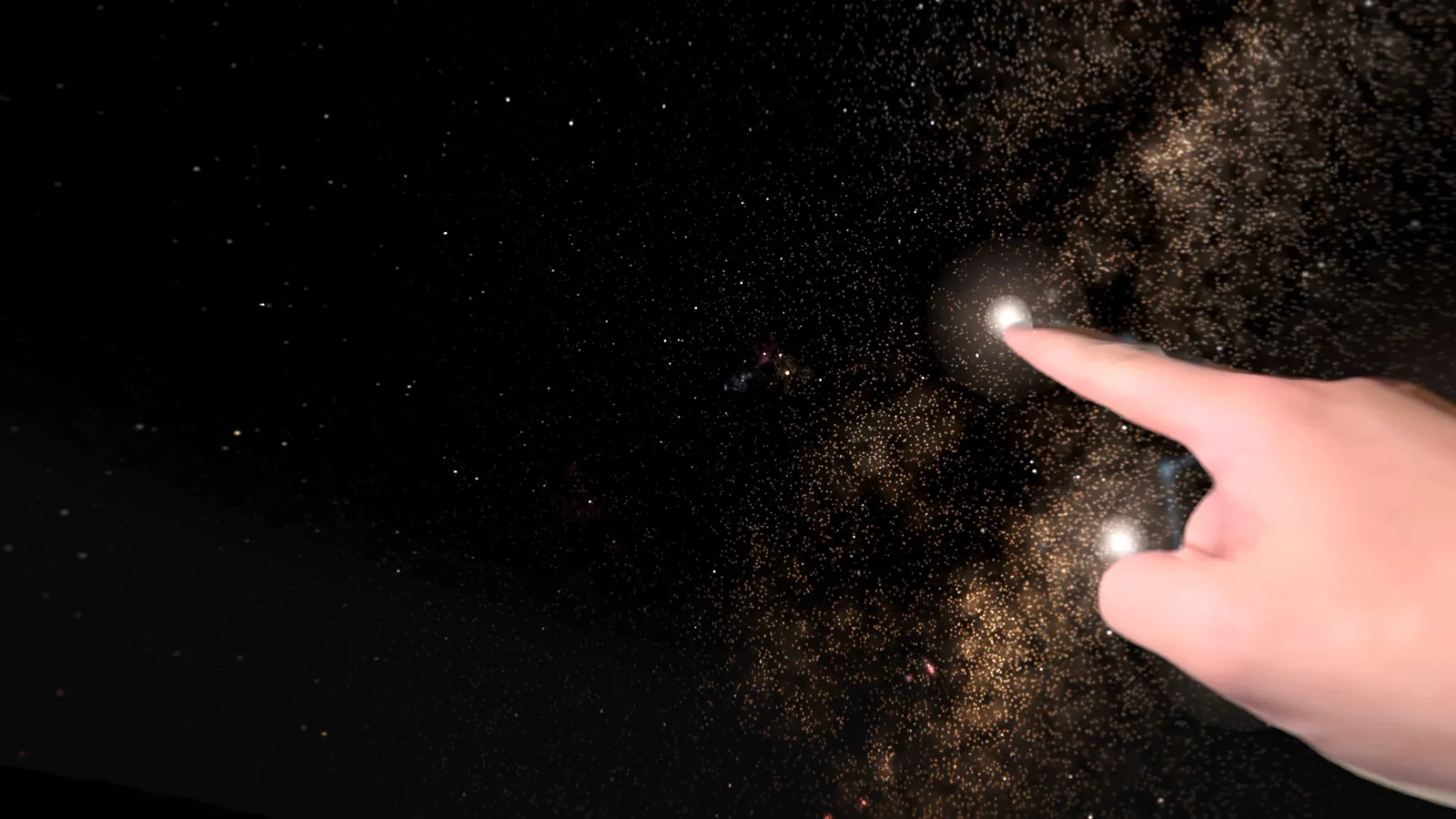
The most relaxing space apps for Apple Vision Pro depend on how much you want to do. With nothing to install, Apple's own Environments put you on the Moon or beside Jupiter, and the Mindfulness app adds a guided breath. For a starry sky that talks you through it, Night Sky by iCandi Apps has a fully immersive planetarium with spoken tours. Constellations by Parietal Lab ($4.99) is a calm sky you can join the dots on, Vast Haven-1 VR (free) shows Earth through a space station's domed window, and Astronoma (free) has orbital scenes with ambient music. Everdust, which we make, puts the real night sky around you from some of the darkest places on Earth, with a sleep timer and guided rest, free.
We make Everdust, so read this with that in mind. Every other app is described from its own US App Store listing, or Apple's Apple Vision Pro User Guide for what's built in, checked on November 28, 2026, and we say plainly where another app is the better pick. Prices change, so check before you buy.
The short answer
- Nothing to install: Apple's Environments, such as the Moon or Jupiter, with the Mindfulness app for a guided breath.
- Best for winding down under the real night sky, with a sleep timer and guided rest: Everdust (we make it). Night Sky shows the real sky around you, from home or a dark-sky site, and Calm adds a sleep timer, breathing and a guided rest as a slow drift down a glowing river. Night Sky is free, and so is one full session of each Calm tool. No ads.
- A starry planetarium with spoken tours you can lie back to: Night Sky by iCandi Apps.
- A quiet sky to learn the constellations under, or just to be in: Constellations by Parietal Lab.
- Earth from orbit, through a big window: Vast Haven-1 VR, free.
- Slow orbital views with ambient music: Astronoma.
- Breathing exercises in a nebula, with a timer: Lungy.
Environments and Mindfulness (built in)
Environments
Environments by Apple replace your room with a place, and two of them are in space. The Moon is one, and Jupiter has a time-of-day slider and an orbit-speed control, under Explore Jupiter in Control Center. visionOS 27 adds Thórsmörk, a night in Iceland with a shifting aurora. Turn the Digital Crown to choose how much of your room you still see, and set the environment's own sound with its volume slider. They're built into visionOS, so they're free.
Pick it if you want a calm sky with no app and no setup.
Mindfulness
Mindfulness by Apple, built in too, isn't a space app, but it pairs well with one. It offers guided meditations or a self-guided session of the length you choose, and with Follow Your Breathing on, its animation and sounds follow your breath; the view darkens gently as it starts, whichever Environment you're in. Free.
Pick it if you want a short breathing session on the Moon.
Night Sky by iCandi Apps
Night Sky by iCandi Apps describes its Vision Pro version as designed for visionOS 27, with a fully immersive planetarium. Its voice-guided tours let you set the length and have objects presented to you one by one, which suits watching with your hands in your lap, and a soft ambient sound plays when you're fully immersed. Curated tours, landing on planets and its orrery need Night Sky+; Night Sky+ Aura, its AI astronomer, is a separate subscription. It's free to download, with Night Sky+ purchases listed at $5.99 to $49.99 and Aura at $9.99 a week, $17.99 a month or $69.99 a year.
Pick it if you want a planetarium that talks you through the sky.
Constellations by Parietal Lab
CONSTELLATIONS by Parietal Lab by Parietal Lab, LLC is built for Vision Pro. Its listing invites you to "learn all 88 IAU constellations, or just immerse yourself in the calm, relaxing environment", under a sky of stars around you. It costs $4.99, with no in-app purchases, and needs visionOS 26. It came out in November 2026.
Pick it if you want something gentle to do under a calm sky.
Vast Haven-1 VR
Vast Haven-1 VR by Vast Space, LLC puts you in a commercial space station with, in its listing's words, "an expansive, 180-degree view of Earth through the domed window", on a tour led by the astronaut Andrew Feustel. Since version 1.2 it stays fully immersive throughout. Free; it needs visionOS 26.5.
Pick it if you want to sit and watch Earth turn below you. It's a guided tour, so it has a start and an end.
Astronoma
Astronoma by Miguel Garcia Gonzalez is a "space center" of immersive scenes: a Space Station view built on NASA's Blue Marble imagery, an orbital view, The Orbit, and a Uranus environment with relaxing ambient music. It's free to download, with in-app packs from $3.99 to $5.99, and needs visionOS 26. It's on Apple TV too.
Pick it if you want slow space scenes with music, to leave running.
Space Vision
Space Vision: Learn Astronomy by Visionly LLC switches between space environments made from NASA imagery, with ambient music and immersion you set with the Digital Crown. It's listed under Education and leans toward learning, with the Solar System and Voyager 1 free and more missions in SV+, $9.99 a month or $99.99 a year.
Pick it if you want space backdrops with a guide, more learning than lounging.
Lungy
Lungy: Immersive Calm Spaces by Pia Health Ltd is a breathing app rather than a space app, with one space scene: Nebula. Its listing describes breathing exercises and a timer of up to 20 minutes. It costs $4.99, with Full Access in-app purchases at $9.99 and $14.99, and needs visionOS 2.
Pick it if breathing is the point and a nebula is the place.
Everdust (we make this one)
Everdust by Decosa, Inc. is a universe you can reach into, and two parts of it are made for slowing down. Version 1.1.1 is on the App Store for Apple Vision Pro.
- Night Sky. The real night sky all around you, for your place and time: about 8,900 naked-eye stars where they really are, turning at the Earth's real rate, so it looks still. Watch from home or from one of the world's great dark-sky sites, such as the Atacama, Maunakea or La Palma, or from where the aurora is seen, such as Abisko or a fjord by Tromsø, and turn on the aurora. Leave star trails drawing, watch a meteor shower on its real date, or choose how dark the sky is. When you want more, look at a nebula and pinch to fly into real photographs from Webb, Hubble and other observatories.
- Calm. Guided rest (NSDR) as a slow drift down a glowing river, guided breathing, a sleep timer and a focus timer, with an optional, silent evening reminder.
- And to watch. Every world is a live simulation, not a video, in your room or in full immersion, and can move with your music: stream free Mixes, play your own songs or play music from your iPhone. In the Laser Show, lasers all around and above you play to your music, and nothing strobes.
It's free to download, with no ads and no account. Night Sky and all its wonders are free, and so are every world, every music source, Solar System to Scale and all of The Story of Everything. One full session of each Calm tool is free; Everdust Plus, optional, unlocks the rest of Calm, every Story chapter and every game level: $4.99 a month, $29.99 a year (7-day free trial) or $79.99 once on the US App Store, and one purchase covers iPhone, iPad, Mac, Apple TV and Apple Vision Pro. It needs visionOS 2 or later. More on what's real in the sky and what's a model: Everdust Night Sky on Apple Vision Pro.
Pick it if you want to lie back under a real dark sky, or drift off with a sleep timer and guided rest.
Also worth a look
- Celestia XR by Linfeng Li (free): drift through a 3D universe at your own pace, at any speed you like. Its listing mentions no sound or relaxation features.
- Earthlapse by Jetson Creative LLC (free): 20 views of Earth filmed by NASA astronauts, with nine relaxing space soundtracks. It's an iPad app, so on Vision Pro it plays in a window rather than around you.
- Vibescape by Apposite LLC ($9.99): calm scenes with a timer, including Winter Lights, where the stars twinkle.
Side by side
| App | Price (US) | Best for |
|---|---|---|
| Environments | Built in | The Moon or Jupiter, with no app |
| Mindfulness | Built in | A guided breath, in an Environment |
| Everdust | Free; Night Sky free; Plus optional | The real night sky from a dark-sky site; a sleep timer and guided rest |
| Night Sky (iCandi Apps) | Free; Night Sky+ in-app | A planetarium with spoken tours |
| Constellations | $4.99 | A calm sky, and the constellations to learn |
| Vast Haven-1 VR | Free | Earth through a space station's window |
| Astronoma | Free; packs from $3.99 | Orbital scenes with ambient music |
| Space Vision | Free; SV+ $9.99 a month | Space backdrops with a guide |
| Lungy | $4.99 | Breathing in a nebula |
| Earthlapse | Free | Astronaut footage of Earth with soundtracks, in a window |
How to choose
- For a few quiet minutes, open the Moon Environment and the Mindfulness app. Both are already on your Vision Pro.
- To lie back under the real sky, Everdust's Night Sky, and its Calm sleep timer and guided rest to drift off, free.
- To be talked through the sky, iCandi's Night Sky tours.
- To watch Earth, Vast Haven-1 VR for the station's window, or Earthlapse in a window while you do something else.
- To learn the constellations slowly, under a calm sky, Constellations.
For star maps and planetariums to learn from rather than relax with, see the best Vision Pro apps for space and astronomy. For music, see music visualizer apps for Apple Vision Pro.
Questions people ask
What is the most relaxing space app for Apple Vision Pro? For the real night sky, Everdust, which we make: its Night Sky puts the real sky around you from home or a dark-sky site such as the Atacama, and its Calm tools add a sleep timer, breathing and guided rest, with Night Sky free and no ads. With nothing to install, Apple's Moon and Jupiter Environments. For spoken tours of the stars, Night Sky by iCandi Apps.
Can I fall asleep under the stars in Apple Vision Pro? Everdust has both halves: the real night sky in Night Sky, and a sleep timer and guided rest among its Calm tools, with Night Sky free and one full session of each Calm tool free. Apple's Moon Environment is a quiet place to rest too.
Is there a space environment in Apple Vision Pro? Yes. Apple's Environments include the Moon and Jupiter, where you can change the time of day and the orbit speed; visionOS 27 adds a night with the aurora in Iceland. Turn the Digital Crown to choose how much of your room you see.
Which Vision Pro space apps are free? Apple's Environments and Mindfulness are built in. Vast Haven-1 VR and Celestia XR are free, Astronoma and Space Vision are free to download with in-app purchases, and Everdust is free to download, with its Night Sky free. Constellations ($4.99) and Lungy ($4.99) are paid.
Do these apps fill the room or play in a window? Environments, Everdust, iCandi's Night Sky, Constellations, Vast Haven-1 VR, Astronoma and Space Vision can surround you. Earthlapse is an iPad app, so it plays in a window.
Sources
- Each app's own US App Store listing, linked in its section, checked November 28, 2026: price, in-app purchases, seller, minimum visionOS and the features its description and release notes name. Constellations' release month from Parietal Lab's own announcement.
- Apple: the Apple Vision Pro User Guide on Environments, adjusting immersion and Mindfulness, and visionOS.
- Everdust: Space Science Games on the App Store (the Apple Vision Pro 1.1.1 description and In-App Purchases), checked November 28, 2026, and Everdust Night Sky on Apple Vision Pro.